ℹ️ Quick Answer: AI agent workflows let you hand off repetitive personal tasks like email triage, meeting scheduling, and purchase research to AI tools that actually do the work for you. The best starting points are your inbox, your calendar, and the boring research you do before every buying decision.
📋 WHAT’S INSIDE
- Tame Your Never Ending Email Inbox
- Stop the Back and Forth Scheduling Game
- Outsource Your Research Rabbit Holes
- Clean Up Your Digital Mess
- Draft All the Boring Stuff You Write Over and Over
- AI Agent Workflows That Aren’t Worth It Yet
- FAQs
AI agent workflows sound like they’re built for tech companies with big budgets. They’re not. They’re for you. My inbox used to be a source of constant, low-grade anxiety. Important messages from my kid’s school buried under newsletters I subscribed to three years ago and a mountain of promotional junk. Then last Tuesday I spent 20 to 30 minutes trying to schedule a single 1 on 1 meeting. Four emails back and forth. “How about Thursday?” “Thursday doesn’t work, what about next week?” “Next week I’m traveling.” By the time we picked a date, I’d lost interest in coffee entirely.
That’s the kind of moment that makes you think, okay, maybe the robots should handle this one.
There’s a lot of noise right now about AI agents. Most of it is aimed at IT departments and enterprise software buyers. That’s not who I’m talking to. I’m talking to you. The freelancer with 847 unread emails. The side hustler who spends Sunday nights answering the same five Instagram DMs. The person who spent three hours last weekend comparing air purifiers and still didn’t buy one.
These are five personal AI agent workflows where handing things off to an AI actually makes sense right now. Not in some imaginary future. Right now, with tools you can sign up for today.
1. Tame Your Never Ending Email Inbox
Gmail’s free Gemini features can scan your inbox, flag what matters, draft replies, and surface buried details like tracking numbers and school events so you stop deleting important messages by accident.

The average person receives about 80 emails per day. If you’re running a side business or freelancing, it’s probably double that. And according to cloudHQ’s workplace report, people spend roughly 11 hours per week just managing their inbox. That’s more than a full workday, every single week, just reading and sorting messages.
I like a clean inbox. Maybe it’s my ADHD, maybe I’m just wired that way, but a pile of unread messages stresses me out. For the longest time my solution was simple. Delete everything. I rarely ever needed to go back and look at old emails anyway, so I’d just nuke the whole thing and move on with my day. It worked. Until it didn’t.
There’s always that one email. The one you actually needed. A confirmation number for a flight. A receipt you need for a return. Something from your kid’s school about a schedule change. You deleted it two days ago and now you’re digging through your trash folder hoping it’s still there. That was my cycle for years.
Then Gmail rolled out Gemini-powered AI features a few weeks ago and it honestly changed how I deal with email. The AI can find particular details buried in my messages without me scrolling through everything. I can ask it things like “did anyone send me a tracking number this week” and it just pulls it up. The AI Inbox tab also surfaces to-dos from my messages, stuff like a bill due tomorrow or a school event I need to know about. Free for everyone with a Gmail account.
The part that really sold me is using Gemini before I go on a deleting spree. Now instead of just wiping everything and crossing my fingers, I ask it to flag anything important first. It scans through and tells me which emails I should hang on to, then I delete the rest with zero guilt. It’s like having someone double check your work before you shred the whole filing cabinet.
If you want something more aggressive, Spark Mail costs about $7.99 a month and uses AI to draft replies, summarize threads, and prioritize what matters. Superhuman goes further at $30 a month with AI that learns your writing style, but that’s steep for a personal tool. Apple users running iOS 18 or later get Apple Intelligence email summaries baked right into the Mail app for free. I compared all the top options in my AI email management guide if you want the full rundown.
None of these tools are perfect at understanding tone. You still need to read what it writes before hitting send. Think of it as a first draft machine, not autopilot.
2. Stop the Back and Forth Scheduling Game
AI scheduling tools like Reclaim AI (free tier), Motion ($19/month), and Cal.com (free with AI phone booking) check your calendar and handle the back and forth negotiation so you never send another “are you free Tuesday?” email.
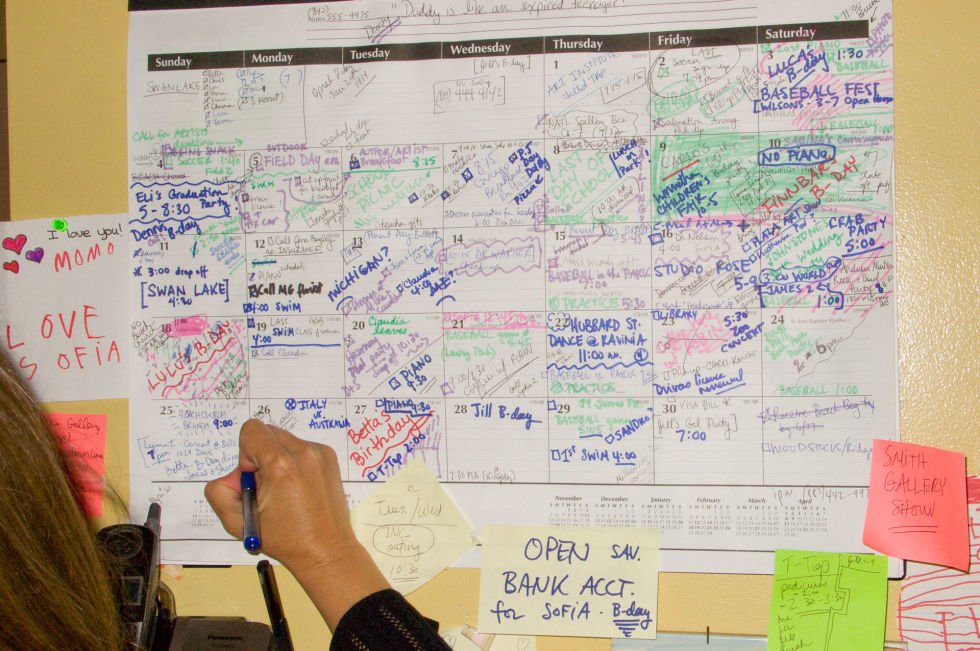
You know the dance. You’re a freelancer trying to book a call with a new client. You send an email. “Are you free next week?” They reply, “Sure, how about Tuesday?” You reply, “Tuesday is good, but only in the morning.” They come back, “Morning doesn’t work, what about Thursday?” Nearly 43% of workers spend more than 3 hours per week just scheduling meetings. Not attending them. Scheduling them. It can take five emails just to find one 30-minute slot.
AI scheduling agents look at your calendar, know your preferences, and handle the negotiation for you.
Reclaim AI is my pick for freelancers and solopreneurs. The free plan covers basic smart scheduling, and the paid version starts at $8 a month. It learns which hours you protect for deep work, which meetings you’re flexible on, and rearranges your calendar in real time when conflicts pop up. Motion does something similar but costs $19 a month, which feels like a lot unless scheduling problems are really wrecking your week. Cal.com offers a free tier with unlimited bookings and integrations, and their AI agent can even handle phone calls to book and confirm meetings. I covered the full range of these tools in my AI calendar scheduling guide.
I have to be honest here though. It has to be the right tool for the right situation. We ran a small pilot for a tool called Clockwise at my old office. For the people who had it, scheduling was amazing. The AI would automatically find focus time and move meetings around to create open blocks, but for the people who didn’t have it, it actually created more friction. Their calendars suddenly filled up with AI-generated appointments that they didn’t have the context for. The tool only really works when everyone buys in. That’s the honest truth about most scheduling AI.
For personal use or with clients, sending a simple Cal.com or Calendly link is often the better, less intrusive way to go. If you’re also drowning in meeting notes, I covered tools for that in my AI meeting assistants guide.
3. Outsource Your Research Rabbit Holes
Perplexity’s free shopping assistant compares products, summarizes reviews, and gives sourced recommendations in seconds, replacing the 5+ hours people typically spend researching a single major purchase.
Remember the last time you had to make a semi-important decision? Maybe you needed a new laptop. Or you were looking for a new dentist. Or you were trying to plan a family vacation. My process used to be opening a dozen browser tabs with reviews from one site, pricing from another, and articles all saying different things. Rarely effective.
Turns out I’m not alone. Travelers spend over 5 hours on average researching a single trip, and 81% of shoppers do online research before buying anything significant. We’re all spending massive amounts of time on comparison shopping, review reading, and option weighing.
This is where AI agent workflows really shine for regular people.
Perplexity now has a full shopping assistant that remembers your past searches, learns your preferences, and presents product recommendations with pros, cons, and review summaries in one place. You can ask something like “what’s the best budget office chair for someone with lower back pain” and get a sourced answer in seconds instead of opening 15 browser tabs. The shopping features are free for US users, with PayPal integration for direct purchasing. I wrote a whole guide on using AI shopping assistants if you want to see more options.
AI research agents are great for general comparison shopping and initial research. They’re not great for hyper-specific, niche decisions. If you need the best left-handed mechanical keyboard with Cherry MX Brown switches under $80, you’re still better off on Reddit.
4. Clean Up Your Digital Mess
Google Photos uses Gemini AI to search, group, and identify junk photos for free, while Mylio Photos ($20/month) adds cross device AI tagging by location, people, and color.
This is the one nobody talks about because it’s deeply boring, but look at your phone right now. How many screenshots are sitting in your camera roll that you’ll never look at again?
Google Photos uses AI to let you search for terms like “screenshots,” “blurry,” or “documents” to identify junk for mass deletion. Gemini in Google Photos can automatically group your pictures and even suggest which ones are the best from a series of burst shots. You can just ask it “find my best photos from my trip to the beach last summer” and it’ll pull them up. Free and it works.
For something more powerful, Mylio Photos is free for single-device use and uses AI to tag photos by location, people, animals, and color tones. The full cross-device version runs $20 a month. There are also AI-powered duplicate finder apps that scan your storage and identify redundant files by actually checking content, not just filenames. For broader digital organization, Notion AI works as a free “second brain” for notes, bookmarks, and random thoughts.
No AI tool will fully organize your digital mess without upfront effort. Plan to spend a weekend getting things set up. After that, maintenance is mostly automatic.
5. Draft All the Boring Stuff You Write Over and Over
TextExpander ($3.33/month), ChatGPT with custom instructions (free), and Claude Projects can all draft your repetitive emails, DM replies, and client responses in your voice so you just review and hit send.
Think about how many times you type the same thing. As a writer, I’m constantly sending the same “Thanks for your interest in my work!” email, or answering the same engineering questions, or sending a similar DM reply on Instagram. Each one only takes a minute, but all those minutes add up. According to TextExpander’s research, email writing eats up about 28% of the average workday. Most of that is the same kinds of messages with slightly different details.
You can hand off the first draft of all of this to an AI. This isn’t about being fake. It’s about being efficient. Of all the AI agent workflows on this list, this one might have the fastest payoff.
TextExpander with AI features starts at $3.33 a month (billed annually) and lets you create snippets that expand with a few keystrokes. Type “;thanks” and your full “thanks for reaching out” message appears, with fill-in-the-blank fields for names and project details. It works across every app on your computer.
ChatGPT with custom instructions is another approach. Set up your voice and typical responses, paste in an incoming message, and it drafts something that sounds like you. Free plan works fine. Claude Projects takes it further by letting you bake in your business context, writing style, and example responses.
Apple Intelligence is building this right into the operating system too. You’re not letting the AI have the conversation. You’re letting it do the initial typing. You still read it, tweak a word or two, then hit send. It frees up your brainpower for the writing that actually matters.
AI Agent Workflows That Aren’t Worth It Yet
Skip AI for core creative work, emotional conversations, and anything where being wrong has real consequences like medical advice, legal decisions, or managing your finances.

AI is an amazing tool, but it’s not the right tool for everything. Handing off the wrong task to an AI is, at best, unhelpful and, at worst, a disaster.
Your core creative work is a good example. Can an AI write a blog post or design a logo? Sure, but it won’t have your voice, your unique perspective, your soul. Use it for ideas or first drafts, but the final product should be yours. Don’t outsource the very thing that makes you you.
Same goes for emotional conversations. A breakup text written by AI? A note of condolence? A difficult conversation with a family member? Absolutely not. These conversations require empathy, history, and a real human heart. I tried using AI to help draft birthday messages and thank-you notes once. They came out technically fine but weirdly hollow. If someone matters to you, write it yourself.
And then there’s anything where being wrong has real consequences. Don’t ask an AI for medical advice. Don’t ask it for a definitive legal interpretation. Don’t ask it to manage your life savings. These are areas where you need a qualified, accountable human professional. AI can be confidently wrong, and the stakes are just too high.
Frequently Asked Questions About AI Agent Workflows
Is this stuff hard to set up?
Mostly no. A lot of these AI features are being built directly into apps you already use, like Gmail, Google Photos, or your phone’s operating system. For the standalone tools, it’s usually just a matter of signing up on a website and maybe connecting it to your calendar or email account. You definitely don’t need to know how to code.
What’s the cheapest way to start with AI agent workflows?
Start with what you already have. Gmail’s Gemini features are free. Apple Intelligence is free if you have an iPhone running iOS 18 or later. Perplexity’s shopping assistant is free. ChatGPT’s free plan handles custom instructions. You can automate your first workflow without spending a dollar.
Will an AI read all my private stuff?
This is a valid concern. The major tools like Gmail, Apple Intelligence, Reclaim AI, and Spark process data using standard encryption and privacy policies. My personal rule is simple. If the information is extremely sensitive or private, I don’t put it into an AI. For summarizing a public newsletter or scheduling a business call, I’m much less concerned. Read the privacy policy before connecting anything.
What if I don’t like what the AI does?
That’s the most important part. You are always in charge. You can edit the email draft the AI writes. You can ignore the summary it provides. You can choose to do your research the old-fashioned way. Think of the AI as a suggestion, not a command. You’re the boss of your own workflow.
Where to Go From Here
Pick one workflow from this list, set it up, test it for two weeks, and see how much time you get back.
If you’re just getting started with AI tools, our Start Here page walks you through the basics. You can also browse our Guides section for step-by-step tutorials on specific tools, or check out our Tools reviews for honest breakdowns of what’s worth paying for.
The best AI agent workflow is the one that removes a task you actually hate doing. Start there.
WHO WROTE THIS
Moses Smith. I write Everyday AI for people who aren’t engineers. I go try the tools, then tell you honestly whether they were worth it. Sometimes the answer is no, and that’s kind of the point.
This blog is free and has no ads. If it saved you some time, you can buy me a coffee.